NouTube APK Download Latest
How to install NouTube APK Download Latest V0.5.0 APK?
1. Tap the downloaded NouTube APK Download Latest V0.5.0 APK file.
2. Touch install.
3. Follow the steps on the screen.
Description
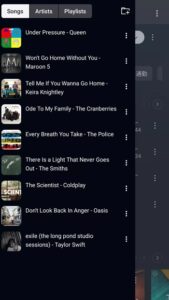
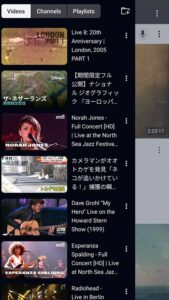
NouTube APK is an innovative app that combines YouTube and YouTube Music into one convenient platform. Watch videos, listen to your favorite music, and manage playlists without annoying ads. Content can play in the background even when you’re using other apps or your screen is off.
What is NouTube APK?
NouTube APK is a next-generation video streaming platform designed for users who demand a clean, fast, and fully customizable experience. Whether you want to watch your favorite creators, enjoy ad-free content, or download videos for offline viewing, NouTube APP offers powerful tools and an intuitive user interface.
This app is perfect for users who want uninterrupted entertainment and more control over their viewing habits. Manage your watch list and music library without logging in. You can also hide YouTube Shorts for a more immersive viewing experience.
NouTube APK Features
Use without an account: No registration required. Start using it immediately without consuming your data plan.
Video and audio downloads: Download your favorite videos for offline viewing or extract audio directly to your device.
Custom themes and interface: Customize your experience with dark mode, various color schemes, and advanced layout customization.
Smart suggestions: Discover relevant and popular content with improved algorithmic suggestions.
Advanced playback controls: Manage playback speed, resolution, and playback gestures such as swipe seeking and volume control.
Region unblocking: Access content blocked in your country with the built-in region bypass option (where applicable).
Sleek and fast design: Optimized for both high-end and low-end devices.
Tips for Effectively Using NouTube APK
Listen to audio only in the background: If you’re listening to music or long videos, start playback and then switch to another app. it will continue playing the audio in the background. This is especially useful for multitasking or when your screen is off.
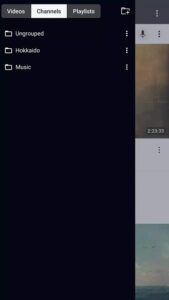
Organize content with bookmarks and watchlists: You can create custom bookmarks for channels, playlists, and your favorite videos. For example, if you subscribe to many educational channels, you can group them using bookmarks to quickly access content without wasting time searching.
Hide short videos to declutter your feed: Enable the option to hide short videos in the settings. This will keep your main feed focused on regular videos and music, giving you access to more relevant content based on your interests.
Use live chat: For live streams, ensure a stable internet connection for smooth chatting. Tap the chat icon to interact with other viewers without interrupting playback.
Frequently Asked Questions
Q: Can I hide short videos on NouTube APK?
A: Yes, you can hide short videos from your feed to focus on longer videos and music.
Q: Can I stream music using the NouTube APP APK?
A: Yes. Many users utilize NouTube as a music player due to its background audio support and stable playback.
Q: Does it support chat during live streams?
A: Yes. Chat is available during live streams and can be accessed directly within the app.
Q: Does it require a Google account?
A: No. It does not require registration, allowing users to browse content, listen to music, and manage favorites anonymously.
Conclusion
NouTube MOD APK is ideal for users who want more control over their streaming video app, fewer interruptions, and superior performance. Whether you want to watch the series without interruption or only watch the videos uploaded daily, it gives you complete control.
Images